

Do you know that 57% of consumers actively communicate with businesses on WhatsApp? This statistic highlights the growing importance of WhatsApp as a communication platform for businesses.
WhatsApp Business Cloud API is a tool that helps businesses connect with customers on their preferred platform. Launched in 2022 by Meta, it seamlessly integrates WhatsApp Business features into your existing apps. Forget complex on-premise solutions – Cloud API makes it easier than ever to use WhatsApp’s massive user base to grow your business.
Traditional solutions often require businesses to host and maintain their own servers, adding complexity and cost. Cloud API cuts through this by providing a user-friendly and cost-effective cloud-based infrastructure. In this blog, we will talk about WhatsApp Cloud API, and how it can help your businesses enhance customer communication.
What is WhatsApp Cloud API?
WhatsApp Cloud API is the cloud-hosted version of WhatsApp Business API. It acts as a bridge between businesses and customers through the familiar platform of WhatsApp.
With the Cloud API, you can integrate WhatsApp’s functionalities directly into your systems and applications and send and receive messages effortlessly. This service makes it simple to
- Automate interactions
- Manage customer queries
- Provide timely support
- Enhance customer engagement
- Send Bulk Messages
Previously, only WhatsApp Partners and Business Service Providers (BSPs) could build on top of WhatsApp using its APIs. Now, Meta has removed this hurdle. You can create and get a WhatsApp Cloud API account approved directly through Facebook. This change makes it easier for businesses of all sizes to capitalize on the power of WhatsApp for customer communication.
Key Features of WhatsApp Business Cloud API
WhatsApp Cloud API goes beyond simply sending and receiving messages. It offers a range of features designed to enhance your customer engagement. Here are some of the key features:

Seamless Omnichannel Communication
Using Cloud API, you can connect with your customers using both live agents and automated systems. This ensures that your customers receive timely responses, whether it’s through a chatbot or a human representative.
Unified Customer Experience
The API provides seamless integration with your existing CRM and e-commerce platforms. This creates a centralized hub for all customer interactions, giving you a holistic view of customer relationships. Imagine accessing a customer’s purchase history and WhatsApp chat history within the same platform. This lets you personalize their experience and provide them with better service.
Bulk Messaging and Payment Handling
Reach a wider audience and generate leads with targeted bulk messaging capabilities. The Cloud API lets you send promotional offers, appointment reminders, or product updates directly to your customer’s WhatsApp. This direct communication channel promotes engagement and can significantly improve conversion rates.
Additionally, Cloud API integrates with payment gateways, making it easy for customers to buy your products directly within WhatsApp. This creates a smooth and convenient buying experience.
Scalability and Reliability
Thanks to its high-throughput design, Cloud API delivers messages quickly and reliably. Also, automated updates ensure smooth and uninterrupted communication. This scalability makes Cloud API perfect for businesses of all sizes and is particularly useful during peak times when message volume is high.
Differences Between WhatsApp Cloud API and On-Premise API
When it comes to integrating WhatsApp Business API into your system, you have two options: Cloud API and On-Premise API. Each has its own strengths, so let’s break it down to help you pick the perfect fit.
Here’s a quick comparison table to get you started:
| Feature | Cloud API | On-Premise API |
| Hosting | Hosted by Meta on their servers | You host the API on your own servers |
| Maintenance | Managed by Meta (including software updates) | Managed by BSPs (software upgrades require BSP action) |
| Access | Direct access through Meta | Access through a Business Solution Provider (BSP) |
| Throughput (messages/sec) | 80 messages per second (MPS) by default and up to 1,000 MPS by automatic upgrade | Up to 250 |
| Cost | Pay per conversation and messages sent | Pay per conversation, messages sent, and server maintenance/BSP charges |
| Control & Customization | Less options for control and customization | More options for control and customization |
| Protocol | Uses REST API | Uses Graph API |
Breaking it Down
Hosting and Maintenance: Cloud API is a hassle-free choice. Meta handles everything from server upkeep to software updates, letting you focus on your business. With On-Premise, it’s your responsibility to manage your own servers and the API software.
Also, Cloud API is accessible through the Internet. This eliminates the need for physical server infrastructure, allowing businesses to focus more on important concerns like Container Security without worrying about maintaining hardware servers.
Acquisition: Cloud API offers a more straightforward path. You can get direct access from Meta in minutes. The On-Premise option requires going through a Business Solution Provider (BSP), which adds an extra step.
Cost-Effective: Cloud API is generally more cost-effective for smaller and medium businesses, as you only pay for what you use (messages and conversations). On-premise adds server maintenance costs on top of per-message and conversation fees.
While Cloud API offers ease of use and scalability, On-Premise API might be a better fit for businesses with specific needs and a large development team. It offers more options for customization. However, this comes with higher upfront costs and ongoing maintenance.
So, the best choice depends on your specific needs. If you value ease of use, scalability, and cost-efficiency, Cloud API is the way to go. If you have a large development team and require more granular control over the API, On-Premise might be a better fit.
Getting Started with WhatsApp Business Cloud API
There are two main ways to sign up for WhatsApp Cloud API:
Option-1: Directly through Meta for Developers
This is a good option if you have your own development team. You will need to create a Meta Developers account and link a Facebook account. Then, you can create a WhatsApp application and set up your Cloud API access. To send and receive messages and receive notifications, you’ll need to make API calls and set up a webhook endpoint.
Step-by-Step Guide to Setting Up Your WhatsApp Cloud API: Self-Service
Here’s a simple guide to help you get started with Cloud API on your own:
Step 1: Create Your Meta Developer Account
First, visit the Meta for Developers page and log in using your Facebook credentials. If you don’t have a Facebook account, you can create one directly on this page. Once logged in, click the “Create App” button.

Step 2: Select the Type of App and Enter Business Information
When choosing the app type, select “Business.” This selection is crucial for using the WhatsApp Cloud API effectively.
Next, provide some basic details about your business. Select your Facebook Business Manager account from the drop-down menu, and if you don’t have one, move to the next step. Click “Create App” to move forward.
Step 3: Choose WhatsApp from the Dashboard
Once you’re in your Meta dashboard, scroll down until you see the WhatsApp section. Click “Set Up” to begin configuring WhatsApp Cloud API for your business.
Step 4: Accept the Terms and Conditions
On the next screen, you need to accept WhatsApp Cloud API’s terms and conditions. Click “Continue” to move forward. If you didn’t select a Business Manager account earlier, you can skip this selection, and Facebook will handle it.
Step 5: Test the Integration
To ensure everything is set up correctly, send a test message using the test number provided by WhatsApp. You can send this message to your personal or business WhatsApp number. This step is optional but useful for verifying the integration.
Step 6: Connect Your Phone Number
Click “Add Phone Number” in your WhatsApp Cloud API account to connect a phone number. Fill in your business details, then click “Next.” Enter your WhatsApp business profile information in the following step and proceed.
Step 7: Add and Verify Your Phone Number
Now, add the phone number you wish to use with the WhatsApp Cloud API. Ensure this number isn’t already linked to an existing WhatsApp account. A 6-digit verification code will be sent to this number. Enter the code to verify your number.
Step 8: Finalize Your Setup
After verifying your phone number, it will appear in the “Send and Receive Messages” section. You’ve successfully connected your phone number to your WhatsApp Cloud API account.
Step 9: Integrate with a Messaging Platform
The Cloud API doesn’t have a built-in chat interface. To send messages, you’ll need a separate marketing platform. Integrate your CRM software with WhatsApp using the Cloud API to manage and run your messaging campaigns effectively.
You can use a platform like TimelinesAI to easily manage your WhatsApp communication and send bulk WhatsApp messages to segmented audiences.
By following these steps, you can set up the WhatsApp Cloud API, and if you encounter any issues, refer to the tutorial video or support resources provided by Meta.
Option- 2- Embedded Signup provided by a WhatsApp Business Solution Provider (BSP)
Some WhatsApp BSPs offer an embedded signup process within their platform. This can be a simpler option if you already use a BSP for other WhatsApp Business features. The BSPs handle the technical setup and provide ongoing support.
So, which option should you choose?
- If you have a development team and want more control over the setup, then going directly through Meta for Developers might be the way to go.
- If you prefer a simpler signup process and ongoing support, then using a BSP might be a better fit.
Now that you’re all set up, let’s talk about what it’s going to cost to keep the conversation flowing with your customers.
Understanding WhatsApp Business Cloud API Pricing
Understanding the pricing for WhatsApp Business Cloud API is essential for budgeting and planning. Here’s a breakdown to help you get started:
Conversation-Based Pricing
WhatsApp Business Cloud API charges per conversation, not per message. A conversation is a 24-hour window of message exchange between you and a customer. All messages within that window count as one conversation, regardless of quantity.
Types of Conversations and Costs
There are different types of conversations, and each has its own price tag.
Business-initiated conversations: These are conversations you start with a customer, typically using a pre-approved message template. There are three categories with different costs:

User-initiated conversations: These are conversations your customer starts. They are generally cheaper than business-initiated conversations and are often referred to as “service conversations.”
Also Read: A Guide to WhatsApp Conversation-Based Pricing
The pricing for WhatsApp Cloud API also depends on your geographical location and the volume of messages. The best way to get the latest pricing details is to head straight to the WhatsApp Business API pricing page. They’ll have the most up-to-date information for your specific situation.
We’ve gone through the pricing, but is the investment worth it? Let’s look at the benefits that come with using the WhatsApp Cloud API.
Benefits of WhatsApp Cloud API
WhatsApp Cloud API offers many advantages for businesses looking to connect with customers on their favourite platform. Here’s a look at some key benefits:
1. Global Reach
WhatsApp is one of the most popular messaging apps worldwide, with over three billion users. Using the Cloud API, your business can tap into this vast user base and reach customers across the globe.
2. Cost-Effective
With the Cloud API, you don’t need to invest in server infrastructure. Meta hosts the API, reducing the need for extensive IT resources and maintenance.
3. Integration Capabilities
The Cloud API can be easily integrated with various CRM systems, e-commerce platforms, customer support tools, and other business tools. This seamless integration helps streamline operations and improve customer service efficiency.
4. 24/7 Availability
Automated messaging through the API can provide customers with instant responses and support around the clock. This enhances customer satisfaction and can reduce the workload on your support team.
5. Analytics and Reporting
The Cloud API comes with detailed analytics and reporting capabilities. You can track message delivery, read rates, and customer interactions to gain insights and optimize your messaging strategies.
6. Scalability
Cloud API is designed to handle large volumes of messages, ensuring your messaging capacity grows alongside your business. This scalability makes Cloud API suitable for businesses of all sizes, from small startups to large enterprises. Focus on growing your business – Cloud API will handle the messaging.
7. Advanced Automation Capabilities
Cloud API lets you build chatbots, schedule messages based on triggers, and personalize communication at scale using your CRM. This frees up your team’s time to tackle more complex tasks.
With WhatsApp Cloud API, you can connect with customers on their favorite platform, provide exceptional service, and watch your business soar.
Now, let’s switch gears and discuss some limitations you might face when using WhatsApp Cloud API.
Limitations of Using WhatsApp Cloud API
While WhatsApp Cloud API offers a myriad of solutions for businesses, there are some limitations to consider before you go ahead with it:
Limited Control and Customization: Compared to the On-Premise API, Cloud API offers less flexibility for customization. Meta manages the servers and updates, which can limit your ability to tailor the API to your specific needs. This might be a hurdle if you have specific needs for your business.
Technical Expertise Required: Setting up Cloud API effectively often requires technical knowledge. While Meta provides documentation and code samples, developing the integration might require in-house developer expertise or working with a third-party provider.
Potential Costs: Cloud API uses a pay-per-use pricing model based on conversations and messages sent. Depending on your message volume, costs can accumulate quickly.
Dependency on Meta’s Infrastructure: Cloud API runs on Meta’s servers. If they experience an outage, your customer communication could be down, too.
So, consider these limitations to see if Cloud API aligns with your needs.
Using WhatsApp Cloud API with TimelinesAI
TimelinesAI offers several advanced features that can enhance the existing capabilities of WhatsApp Cloud API. Here’s how you can make the most of it:
Shared Inbox: It can be difficult for your business to handle multiple WhatsApp numbers. TimelinesAI offers a shared inbox, giving your team a centralized view of all your WhatsApp conversations. This means seamless collaboration, improved customer service, and a clear picture of your overall communication.
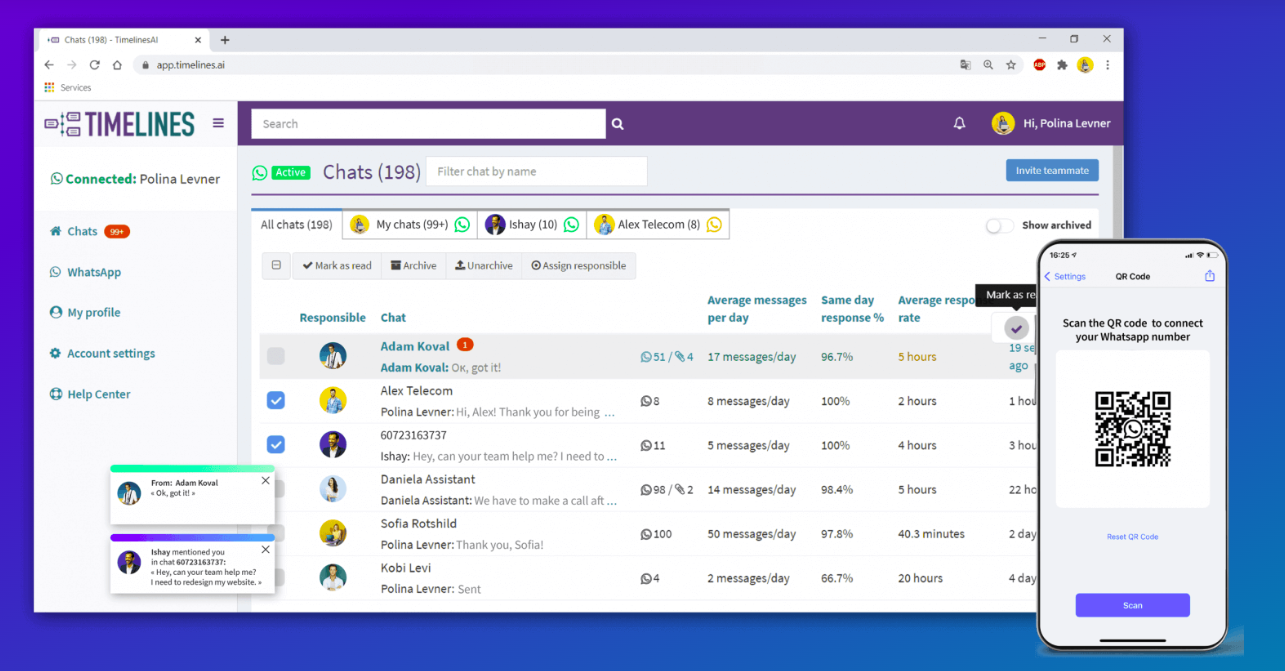
Native CRM Integrations: TimelinesAI offers native integrations with popular CRM platforms like Pipedrive, HubSpot, Salesforce, and monday.com. This ensures every customer inquiry gets a timely response. Also, you can deliver personalized service with all the information at one unified location.

AI-Powered Autoresponders: TimelinesAI provides a ChatGPT-integrated multilingual autoresponder to automate your entry-level communication. Free up your team to focus on strategic issues, while AI takes care of the repetitve tasks.
Conclusion
WhatsApp Cloud API is a powerful tool that allows businesses to connect and engage with customers on their preferred platform. It offers a range of features, including automation, bulk messaging, and seamless integration with other business tools. This can lead to increased customer satisfaction, improved efficiency, and global reach.
For businesses looking to use WhatsApp for customer communication, WhatsApp Cloud API is a strong option to consider. It is easy to set up and use and offers a cost-effective way to reach a large audience compared to On-Premise API.
When it comes to managing your WhatsApp conversations, look no further than TimelinesAI. Features like shared inbox and native CRM integrations can help you streamline your operations, improve customer service, and ensure your business runs smoothly. Start your free trial today!
Frequently Asked Questions: FAQs
Is WhatsApp Cloud API free?
Yes, the WhatsApp Cloud API is free to set up. Businesses have to pay for the messages they send based on WhatsApp’s conversation-based pricing model, and the first 1,000 conversations each month are free.
What is the difference between WhatsApp Business and WhatsApp Cloud API?
WhatsApp Business is a free app designed for small businesses to manage customer interactions. WhatsApp Cloud API, however, is a cloud-hosted service that integrates WhatsApp Business functionalities into your existing apps and systems. It comes with several features, including automation, bulk messaging, and deeper analytics.
Can I automate responses using WhatsApp Cloud API?
Yes, WhatsApp Cloud API supports automation features like building chatbots and scheduling messages. This lets you automate repetitive tasks and provide customers with timely support.
What compliance requirements or policies do I need to consider when using WhatsApp Cloud API?
You need to follow several compliance requirements and policies, including:
- Data Protection Regulations (e.g., GDPR, CCPA)
- User opt-in for marketing messages
- Clear opt-out mechanism
- Adhere to Anti-Spam regulations
- Follow WhatsApp Business Policies


