

In today’s digital age, businesses are constantly looking for innovative ways to enhance customer engagement and streamline their operations. One such technology that has gained significant traction is the use of chatbots powered by artificial intelligence (AI). In this article, we will explore how to create a WhatsApp chatbot using OpenAI, a leading AI platform, in five quick and comprehensive steps.
Before we start with the technical nitty-gritty, let’s talk about the advantages of using OpenAI for your chatbot creation.
Why Should You Use OpenAI for WhatsApp Chatbot Creation?
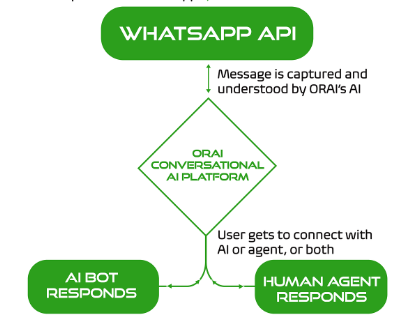
OpenAI offers state-of-the-art natural language processing (NLP) capabilities that enable chatbots to understand and respond to user queries in a human-like manner. By integrating OpenAI with WhatsApp, businesses can automate responses, provide personalized experiences, and improve overall customer satisfaction.
The benefits of integrating OpenAI with WhatsApp include:
- Automation of repetitive tasks: Chatbots can automate responses to frequently asked questions, freeing up your team to focus on more strategic tasks.
- Enhanced Conversational Ability: OpenAI’s large language models like ChatGPT are known for their ability to communicate in a natural and engaging way. This can significantly improve the chatbot’s ability to understand user queries and respond in a way that feels human-like.
- Increased Efficiency: OpenAI’s AI can process information and respond to messages much faster than a human could. This translates to quicker resolution times for customer inquiries, leading to happier customers and a smoother overall experience.
- 24/7 Availability: Chatbots powered by OpenAI can be available around the clock, providing consistent customer service regardless of time zone or business hours.
- Multilingual Support: OpenAI comes with multilingual capabilities. This allows your chatbot to interact with users in different languages. This can be particularly beneficial for businesses with a global audience. However, its proficiency can vary across languages.
- Improved Data Collection: By analyzing user interactions with the chatbot, you can gain valuable insights into customer behavior and preferences. This data can be used to improve your marketing strategies, product development, and overall customer service.
Now, Why Should You Know About WhatsApp Business APIs?
WhatsApp Business API provides businesses with the tools and features to interact with customers on WhatsApp in a professional and efficient manner. These APIs allow for automated messages, chatbot integration, analytics, and more, making it an ideal platform for deploying intelligent chatbots.
Now that we have cleared up a few basics, let’s jump to creating your chatbot.
Step 1: Setting Up OpenAI Account
- Visit the OpenAI website and sign up for an account. Choose the appropriate plan based on your business needs.
- Read and familiarize yourself with OpenAI’s API permissions and usage limits. Different plans may have varying limits on API usage, so choose accordingly.
- Once your account is set up, generate API keys from OpenAI. These keys will be used to authenticate your chatbot’s requests to the OpenAI API.
Step 2: Configuring WhatsApp Business API

Next, you’ll need to configure the WhatsApp Business API.
- Apply for access to WhatsApp Business API through a WhatsApp Business API provider. This may involve a registration process and approval from WhatsApp.
- Create a WhatsApp business account and obtain a phone number dedicated to your business. This number will be used to communicate with customers via WhatsApp.
- Familiarize yourself with WhatsApp’s message templates and session messages. Message templates are pre-approved message formats for specific use cases, while session messages allow for interactive conversations within a session window.
Step 3: Developing the Chatbot Interface

Now it’s time to develop the chatbot interface.
- Select a programming language and framework that best suits your development team‘s expertise and project requirements. Popular choices include Python with Flask or Node.js with Express.
- Then, develop a basic chat interface where users can interact with the chatbot. This interface should allow users to send messages and receive responses from the chatbot.
- Once that is done, integrate OpenAI’s API into the chatbot interface to enable natural language understanding. This involves sending user messages to the OpenAI API for analysis and generating appropriate responses.
Step 4: Testing and Training the Chatbot

Testing and training are crucial steps in ensuring your chatbot performs effectively.
- Simulate conversations with the chatbot to test its responses. Identify any issues or areas for improvement.
- Gather user feedback through beta testing or pilot programs. Use this feedback to refine the chatbot’s responses and improve its accuracy.
Step 5: Deploying the Chatbot on WhatsApp
Once your chatbot is ready, tested, and trained, it’s time to deploy it on WhatsApp.
- Integrate your chatbot with the WhatsApp Business API to enable communication with customers on WhatsApp. Follow the integration guidelines provided by WhatsApp.
- Configure webhooks to receive and process messages in real time. Webhooks allow your chatbot to respond promptly to user queries and actions.
- After deployment, monitor the chatbot’s performance. Keep track of metrics such as response times, user satisfaction, and conversation flow. Make updates and improvements as necessary to ensure optimal performance.
How to Set Up ChatGPT-Powered Auto-Responder with Timelines AI?
Platforms like Timelines AI integrate ChatGPT API into WhatsApp, enabling you to build a smart chatbot. This chatbot can understand customer questions and provide detailed answers without human intervention.
To easily set up a ChatGPT-powered auto-responder in your WhatsApp account using TimelinesAI, follow these simple steps:
Register or Login at OpenAI’s Site:
- Visit the OpenAI website and either register for a new account or log in if you already have one.
- This step is necessary to access the ChatGPT API and generate API keys for authentication.
Navigate to the API Keys Section and Create a New API Key:
- Once logged in to your OpenAI account, navigate to the API Keys section.
- Create a new API Key by following the prompts. Copy the generated API key to your clipboard.
Navigate to TimelinesAI ChatGPT Settings Page:
- Log in to your TimelinesAI account.
- In the left sidebar menu, look for the ChatGPT settings menu item.
- Enter the API Key you copied from OpenAI into the designated field in the TimelinesAI ChatGPT settings page.
Note: If you can’t find it, contact TimelinesAI support to request access to this feature for your workspace.
Customize Auto-Responder Settings:
- In the TimelinesAI ChatGPT settings page, you can customize various settings for the auto-responder.
- Tailor the ChatGPT response to your needs by providing instructions in plain language in the prompt field. You can modify the default prompt to suit your business and specify different responses based on whether it’s the first message in the conversation.
Activate ChatGPT Auto-Responder:
- Once you’ve filled the prompt field based on your requirements, check the “Activate ChatGPT” box.
- You can choose whether to activate the auto-responder in specific WhatsApp chats or enable it in all new chats automatically.
- The auto-responder will automatically respond to incoming messages in WhatsApp chats where it’s enabled.
By following these steps and leveraging TimelinesAI’s integration with ChatGPT, you can easily set up a smart auto-responder in your WhatsApp account. For more details related to integrating ChatGPT, visit this website.
Benefits of using Timelines AI’s ChatGPT-Powered Auto-Responder
- Get started quickly and easily without needing any coding knowledge. Timelines AI handles the technical aspects for you.
- Break down language barriers and cater to your global audience with auto-responses in multiple languages.
- Respond to customer inquiries anytime, day or night, ensuring they never have to wait for a response.
- With the ChatGPT Integration on TimelinesAI, you can get a summary of your chats. This provides a brief overview of conversations with your contacts on WhatsApp, allowing you to stay informed and efficient.
Now let’s understand some good practices that will help you build an efficient chatbot.
Best Practices and Tips for Creating a WhatsApp Chatbot with OpenAI
While the steps outlined above provide a general roadmap for creating your WhatsApp chatbot with OpenAI, here are some additional best practices and tips to consider:
Define your chatbot’s purpose: Clearly identify why you need a chatbot. Is it for answering frequently asked questions, providing customer support, or generating leads? A well-defined purpose will help in the development of development and ensure it meets your business needs.
Focus on user experience: Design your chatbot with a user-friendly interface and natural language interactions. Users should be able to easily navigate the chatbot and find the information they need.
Start simple and scale gradually: Don’t try to build a complex chatbot right away. Begin with a basic chatbot that can handle common tasks. As you gather user feedback, you can add features and functionalities
Personalize the experience: When possible, personalize the chatbot interaction by using the user’s name and tailoring responses based on their previous interactions. This can create a more engaging and helpful experience.
Provide clear and concise information: The chatbot’s responses should be clear, concise, and easy to understand. Avoid using technical jargon or overly complex language.
Monitor and analyze performance: Keep an eye on key metrics like user engagement, conversation flow, and resolution rates. This data will assist in identifying areas for improvement and in constantly refining your chatbot’s performance.
Ensure user privacy and data security: Implement strong security measures to protect user data and privacy. Adhere to data protection regulations and industry standards.
Stay compliant with WhatsApp’s policies: Familiarize yourself with WhatsApp’s policies and guidelines for businesses. Ensure that your chatbot activities comply with these policies to avoid any issues.
By following these best practices and tips, you can create a WhatsApp chatbot with OpenAI that is both effective and user-friendly.
Conclusion
Creating a WhatsApp chatbot with OpenAI offers a powerful solution for businesses seeking to enhance customer engagement and streamline operations. By leveraging OpenAI’s natural language processing capabilities and WhatsApp’s extensive reach, businesses can automate tasks, personalize experiences, and improve overall customer service.
Solutions like Timelines AI simplify the process of creating an autoresponder for users without coding experience. By following the steps outlined in this guide, you can empower your business with a valuable tool to elevate customer service and interactions on WhatsApp. For more information, check out Timelines AI’s website today!


