

Did you know that WhatsApp messages boast an impressive opening rate of 98%?
Not just a number, but a testament to WhatsApp’s effectiveness: according to Sepctrm.io, 57% of customers regularly use WhatsApp to connect with brands, and it’s clear that WhatsApp is a significant platform for fostering direct and engaging communication

Source: Spectrm
But the story doesn’t end there. A staggering 66% of people have made a purchase after engaging with a brand on WhatsApp. These figures paint a vivid picture: delivering good customer service through this platform is no longer a choice; it’s a necessity.
In this blog, we will cover what is WhatsApp inbox, all the benefits, and how you can set it up.
Understanding a WhatsApp Team Inbox
A Team Inbox is a collaborative platform designed for businesses to manage customer communications efficiently. It offers several benefits that go beyond the basic capabilities of what an inbox in WhatsApp can provide:
- Centralized Communication Hub: Access and manage all WhatsApp conversations in one place, streamlining communication.
- Collaborative Messaging: Team members can work together on responses, improving the quality of customer support.
- Organized Conversation Management: Assign chats, use labels, and categorize messages for efficient and structured communication.

Think of it as a mission control center for your customer communication. It keeps everything structured, enabling your team to work together effectively and provide a consistent, efficient experience.
10 Benefits of a Unified Inbox
Customer satisfaction is key to business growth. According to McKinsey, companies that focus on prioritizing customer satisfaction see increased sales and brand loyalty.

A Team Inbox can support this by streamlining communication and enhancing customer service. Here are the key features:
1. Centralized Communication Hub
- A Team Inbox acts as a unified platform for managing all customer interactions in one place.
- Your team can access and respond to messages efficiently, ensuring no inquiries are missed.
- This setup provides a consistent customer experience and keeps the conversation history readily available for reference.
2. Enhanced Team Collaboration
- Team members can share customer information, add internal notes, and assign tasks, improving collaboration and ensuring smooth handling of conversations.
- The platform supports internal chats for quick discussions, enabling team members to seek second opinions or brainstorm solutions for complex queries.
3. Efficient Inbox Management
- Conversations can be assigned to team members based on expertise, with labels used to organize messages by priority or topic.
- Automated tools within the inbox can handle repetitive tasks, such as sending order status updates or appointment reminders, improving efficiency.
4. Elevated Customer Service
- Multiple agents can manage conversations simultaneously, providing prompt responses.
- Automated greetings and pre-written answers for common questions create a welcoming and efficient customer experience.
- A centralized record of interactions allows for context-rich responses and faster resolutions.
5. Sales and Marketing Capabilities
- The platform is not limited to customer service; it can also be used to nurture leads, send targeted messages, and gather feedback.
- Dedicated inboxes for specific teams or campaigns can be created, integrating seamlessly with CRM systems to maintain smooth customer interactions.
6. Scalable Solution for Growing Businesses
- The system is designed to accommodate increasing customer interactions as the business expands.
- Additional team members can be added without the need for major changes to the communication setup, ensuring consistent service quality
7. Integration with Business Tools
- Many team inbox platforms connect with existing tools such as CRMs, helpdesks, and marketing automation systems.
- This integration centralizes customer data, streamlines workflows, and offers a comprehensive view of each customer interaction.
8. Omnichannel Experience Support
- While WhatsApp is effective, some customers may prefer other communication channels like email or social media.
- An effective team inbox integrates these channels, providing a unified platform for managing all interactions seamlessly.
9. Analytics and Reporting Features
- Advanced analytics and reporting capabilities offer valuable insights into customer interactions.
- This data helps identify areas for improvement and refine strategies, enhancing customer experiences and team performance
10. Accountability and Performance Tracking
- The platform allows tracking of individual and team performance metrics, ensuring accountability.
- This transparency helps teams monitor progress, set improvement goals, and maintain high standards of customer service.
By leveraging these features, businesses can optimize communication, enhance collaboration, and deliver an exceptional customer experience.
How to Set Up Your Team Inbox
Getting started with a Team Inbox is quick and easy. Here’s a step-by-step guide on setting up one with TimelinesAI:
1. Create a TimelinesAI Account:
- Head over to the TimelinesAI website.
- Sign up for a new account or log in if you already have one.

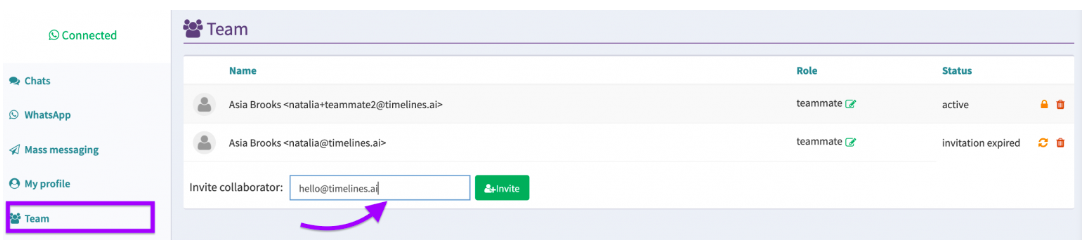
2. Invite Team Members (Optional):
- At this point, you can invite your team to your workspace to collaborate on managing WhatsApp messages.
- TimelinesAI allows assigning roles to team members for better control.
3. Connect Your WhatsApp Accounts:
- On the dashboard, you’ll find an option to connect WhatsApp accounts.
- Grab your phone and open the WhatsApp app.
- Go to the Settings menu in WhatsApp (three dots on Android or gear icon on iPhone).
- Look for the “Linked Devices” or “WhatsApp Web” option.
- This will open a QR scanner within WhatsApp.
- Now, switch back to the dashboard and scan the QR code displayed there with your WhatsApp scanner.
- Repeat this process for each WhatsApp number you want to add to the Shared Inbox.
4. Start Managing Your Shared Inbox:
- Once you’ve connected your WhatsApp accounts, you’ll see a unified inbox displaying messages from all linked numbers.
- You and your team members can now collaborate on managing these conversations.
By following these simple steps, you can effortlessly set up your Team Inbox, enabling your team to manage customer conversations efficiently and collaboratively.
Take Your Customer Service to the Next Level
A Team Inbox is more than just a tool – it’s a powerful platform for streamlining your customer communications and improving team collaboration.
Whether your goal is to enhance customer service, boost sales, or manage an omnichannel experience, implementing a Team Inbox can transform how you connect with your customers and grow your business.
Try TimelinesAI and start optimizing your communication strategy today and see the impact it can make. Sign up today for a free trial and see for yourself!


