

Every business owner knows the importance of getting paid quickly and easily to maintain a healthy cash flow. What if there was a way to streamline this process and get paid directly on a platform your customers already use? WhatsApp Pay lets you do that.
With over 3 billion users in 180 countries, WhatsApp is a major messaging platform. To match their evolving buying habits, people these days are looking for ways to pay quickly and securely without any hassle. With WhatsApp Pay, they can complete their purchase and make the payment without switching apps. Talk about convenience!
In this blog, we will discuss WhatsApp Pay and why your business should offer it as a payment option.
What is WhatsApp Pay?
WhatsApp Pay is a convenient payment service built into the WhatsApp app. It allows you to receive payments from your customers directly through the chat window. No more directing them to external websites or struggling with separate payment gateways.
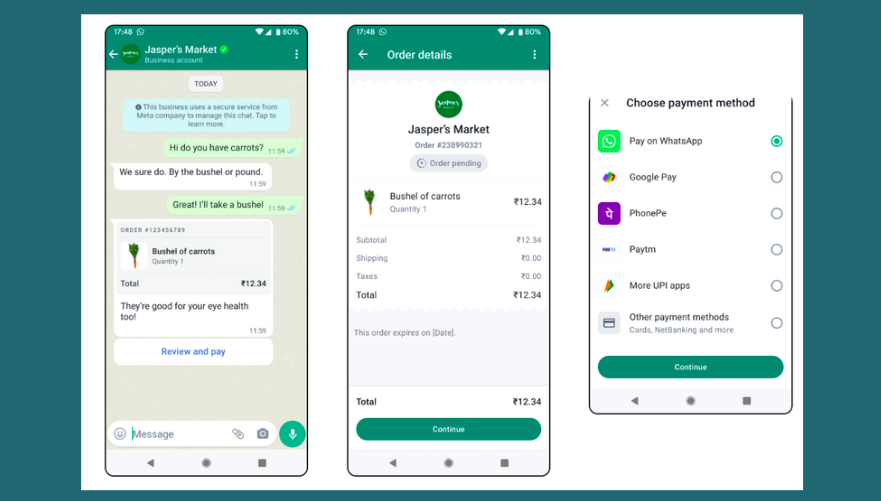
Say a customer browses your product catalog on WhatsApp. They love what they see and decide to purchase. Instead of the usual back-and-forth of sharing bank details or waiting for website redirects, they simply hit the “Pay” button within your WhatsApp chat. This is the convenience that WhatsApp Pay brings to your business. It brings you an end-to-end shopping experience right within the app.
Also Read: How to Build and Optimize Your WhatsApp Business Catalogue in 2024?
Why Does Your Business Need WhatsApp Pay?
We’ve talked about how convenient WhatsApp Pay is for your customers, but guess what? It’s a game-changer for your business as well! Here’s why:
1. Effortless Payments: Imagine a customer ready to buy but stuck waiting for a tedious checkout process. Not ideal, right? WhatsApp Pay gets rid of that friction. Customers can pay instantly within the chat, saving them time and frustration. Happy customers equals repeat business, and that’s definitely a win!
2. Increased Sales: A smooth and quick payment process can reduce cart abandonment rates. According to a study by Baymard Institute, 22% of online shoppers abandon their carts due to a long or complicated checkout process. By offering WhatsApp Pay, you simplify this process and encourage more customers to complete their purchases.
Also, with WhatsApp Pay, customers can complete their purchases right then and there without leaving the app. This impulsive buying power can lead to increased sales.
3. Secure Transactions: In today’s digital world, security is everything. That’s why WhatsApp Pay is built with strong security measures to protect the transfer of money. Plus, it uses end-to-end encryption, which means your customers’ payment information stays completely confidential and secure.
4. No More Cash Handling: Cash handling can be a hassle – counting bills, dealing with change, and worrying about security. WhatsApp Pay removes this burden completely, as all transactions are digital and secure.
5. Reach a Wider Audience: WhatsApp has over 3 billion users worldwide. By offering WhatsApp Pay, you tap into this huge potential customer base. It’s a great way to expand your reach and attract new customers who already love using WhatsApp.
6. Improved Cash Flow: WhatsApp Pay uses the Unified Payments Interface (UPI) for instant payments. This means you can receive money immediately, helping you manage your cash flow better. For example, a small bakery can receive payments for online orders instantly. This way, they have the cash needed to purchase fresh bread or milk.
7. Easy for Everyone: Let’s face it, not everyone is a tech whiz. The beauty of WhatsApp Pay is its user-friendly design. Unlike some complex payment systems, WhatsApp Pay is intuitive and easy to navigate. It makes transferring money as simple as sending a photo or a message.
Even first-time users can be up and running in no time. This means you can capture sales from a wider customer base, regardless of their technical expertise.
8. Streamlined Communication: WhatsApp Pay is not just about easy transactions. Since it’s built right into the WhatsApp app, it creates a one-stop shop for both buying and communication.
You can answer customer questions about products, confirm orders, and even address payment concerns within the same chat window. This real-time communication helps to create a smoother buying experience for your customers.
In a nutshell, WhatsApp Pay is a win-win for everyone as it:
- Simplifies the buying process for your customers
- Boosts sales for your business
- Offers a secure and convenient way to manage transactions.
Sounds pretty good so far, right? Let’s get you set up.
How to Set Up WhatsApp Pay in India and Brazil?
Here’s a quick guide to activating WhatsApp Pay:
First, ensure you have the latest version of WhatsApp installed on your phone and that your bank supports UPI (India) or debit/credit cards linked to Meta Pay (Brazil).

Setting Up WhatsApp Pay in India
- Open WhatsApp and tap on the three dots in the top right corner.
- Select “Settings” from the dropdown menu.
- In the Settings menu, tap on “Payments.”
- Select “Add Payment Method.”
- WhatsApp will then show you a list of supported banks. Choose your bank from the list.
- WhatsApp will ask you to verify your phone number. Ensure the phone number you use for WhatsApp is the same as the one linked to your bank account. You will receive an SMS to confirm your number.
- Follow the instructions to set up your Unified Payments Interface (UPI) account. If you already have a UPI ID, you can link it directly. If not, you can create one during this step.
- Once your UPI is set up, choose your bank account to link with WhatsApp Pay.
You can now send and receive payments directly through WhatsApp in India.
Setting Up WhatsApp Pay in Brazil
- Open the WhatsApp app and click on the three dots in the top right.
- Select Settings and then Payments.
- Since WhatsApp Pay uses Facebook Pay in Brazil, tap on Facebook Pay and choose Add New Card.
- Fill in your card details, including your debit or credit card number. Then, read and accept the terms and conditions.
- You will need to verify your card. This usually involves receiving a verification code via SMS to the phone number linked to your bank account.
- After verification, create a six-digit PIN for Facebook Pay. You will need this PIN for future transactions.
That’s it! You’re now set up to send and receive money securely through WhatsApp Pay in Brazil.
Remember:
- WhatsApp Pay currently partners with specific financial institutions in each region. If your bank isn’t listed yet, don’t worry! New partnerships are being added all the time.
- Also, if the Payments option is not available in your region yet, you might not find it. Keep an eye out for updates from WhatsApp.
Now that we’ve covered the setup, how about sending and receiving payments? Let’s break it down.
How to Send Money with WhatsApp Pay?
This section covers the basic steps common in both India and Brazil:
- Open the Chat: Open your WhatsApp app and go to the chat window with the business you want to send money to.
- Access the Payment Option: There are two slight variations depending on your location:
- India: Look for the attachment icon (paperclip icon) within the chat window.
- Brazil: Locate the “+” button next to the chat textbox.
Once you’ve found the appropriate icon, tap on it.
- Make the Payment: From the menu that pops up, choose the “Payment” option to start the money transfer. Then, enter the exact amount you want to send to the business.
- Verification and Confirmation: Once you enter your PIN (Brazil) or complete the verification process (India), WhatsApp Pay will display a confirmation screen summarizing the transaction details.
Upon confirmation, the money will be instantly transferred from your linked bank account to the business’s account. With these simple steps, sending money through WhatsApp Pay becomes a seamless experience.
Receiving Money with WhatsApp Pay
Receiving money is just as easy. You’ll get a notification when someone sends you money via WhatsApp Pay. Here’s what to do:
- Tap on the notification to accept the payment.
- You might need to link your bank account (India) or verify your card details (Brazil) if it’s your first time receiving money.
- Follow the on-screen instructions to complete the process.
- The money will be deposited into your linked bank account or card.
Interested in how businesses are using WhatsApp Pay? Keep reading.
Use Cases of WhatsApp Pay for Businesses
Here are some interesting use cases that showcase how businesses can use WhatsApp Pay:
| Business Type | Use Case |
| E-commerce Stores | Customers can add products to their cart and pay directly within WhatsApp instead of switching apps to complete checkout. |
| Restaurants & Takeaways | Customers can order and pay for their food directly through WhatsApp, making ordering faster and more convenient. |
| Freelancers & Consultants | Professionals can easily request payments for their services right after a consultation or project completion. |
| Service-based Businesses (e.g. Salons, Gyms) | Businesses can list their services and prices on WhatsApp and receive instant payments for bookings or appointments. |
| Tutors & Trainers | They can collect course fees directly using WhatsApp Pay, offering a hassle-free payment option for students. |
| Online Coaching Platforms | Subscription fees or one-time payments for online courses can be done conveniently through WhatsApp Pay. |
No matter your business type, WhatsApp Pay can streamline your payment process and make things easier for you and your customers.
Pros and Cons of Using WhatsApp Pay for Business
There’s no doubt that WhatsApp Pay offers a convenient way for businesses to receive payments, but it’s not without limitations. Here’s a breakdown of its pros and cons:
Pros:
- User-friendly interface
- No transaction fees from WhatsApp Pay itself
- Convenient & secure transactions
Cons:
- Limited availability (Currently operational in select countries only)
- Reliance on bank support
- Limited compatibility with older smartphone models may exist
Overall, WhatsApp Pay is a good option to make the payment process easier for your customers. However, it’s not a bad idea to be aware of any potential limitations.
Important Considerations with WhatsApp Pay
Before you start using WhatsApp Pay, here are a few things to keep in mind:
WhatsApp Pay Security and Data Practices
Security is very important when it comes to money. So, how does WhatsApp Pay ensure your transactions are safe and your data is protected?

WhatsApp conversations, including payment messages, are protected by end-to-end encryption. This means only you and the recipient can see the payment details. Not even WhatsApp can access these messages.
Multi-factor authentication provides an additional layer of security. Users need to verify their payment with a UPI PIN or biometric authentication, which prevents unauthorized access to their money.
In India specifically, WhatsApp Pay follows the guidelines established by the Reserve Bank of India (RBI). This ensures the platform complies with all regulatory requirements for secure and trustworthy financial transactions.
Transaction Fees and Special Offers
WhatsApp Pay is an excellent option for those looking to avoid additional costs, as it doesn’t charge any fees for person-to-person transactions in most regions (be sure to check for updates specific to your country). However, your bank may have its own fees for using UPI-based payment services like WhatsApp Pay.
WhatsApp Pay occasionally partners with businesses and financial institutions to offer special promotions and cashback on transactions. These offers can help you save money while using the platform.
And before we wrap up, let’s chat about another powerful tool: chatbots.
Take it a Step Further: Chatbots
While WhatsApp Pay simplifies transactions, there’s one more tool that can help your customers. We are talking about WhatsApp chatbots. These AI-powered chatbots can integrate with WhatsApp Pay and offer a truly automated and convenient shopping experience for your customers.

Here’s how chatbots can help your business:
- Always On, Always Available: Chatbots answer questions, take orders, and handle payments all day. This means customers can initiate payments anytime, day or night.
- Lighten the Load: Chatbots handle routine inquiries, freeing up your team for complex issues. This can lead to increased efficiency and reduced costs.
Conclusion
In today’s fast-paced world, convenience is everything. WhatsApp Pay offers a solution that fits perfectly with this modern mindset. It integrates directly into the familiar WhatsApp chat window and provides an effortless and secure payment option.
Whether you’re a small bakery or a larger e-commerce store, WhatsApp Pay can be a valuable asset. It’s easy to use, comes with good security features, and has the potential to reach a wider audience. These factors make it a strong contender in the mobile payment landscape. So, if you’re looking to simplify transactions, boost sales, and create a smoother customer experience, WhatsApp Pay is definitely worth giving a try.
Frequently Asked Questions: FAQs
Q. When was WhatsApp Pay introduced?
A. WhatsApp Pay’s journey began in India with a trial run in February 2018. Partnering with ICICI Bank, they introduced in-app payments to a limited group of one million users.
After receiving approval from the National Payments Corporation of India (NPCI) in February 2020, WhatsApp Pay was gradually rolled out to a wider audience in India.
In March 2022, the company launched a small campaign to announce its official launch in India.
Q. In which countries is WhatsApp Pay available?
A. WhatsApp Pay is fully available in India and Brazil. In Singapore, it is available only for payments to businesses.
Q. Is WhatsApp Pay secure?
A. Security is a top priority for WhatsApp Pay. They use features like end-to-end encryption to ensure your messages and payment details remain confidential. Additionally, multi-factor authentication adds another layer of security.
Q. How does WhatsApp Pay work?
A. WhatsApp Pay allows users to send and receive money directly through the WhatsApp chat interface. It uses the Unified Payments Interface (UPI) in India and Facebook Pay in other regions. Users can link their bank accounts or credit/debit cards, verify their payment details, and use a secure PIN to complete transactions.


