

Shopify owners, ready to turn your browser tabs into cash registers? Read on!
As an experienced Shopify store owner, I understand the crucial importance of conversion rate optimization (CRO) for the success of our online business. The direct correlation between improved conversion rates and increased revenue is undeniable. In this comprehensive guide, I’ll share 13 proven strategies that can help you boost your Shopify store’s conversion rate in 2024 and beyond.
- Leverage High-Quality Visuals
Just like Airbnb’s approach to listing photos, Shopify store owners should invest in professional, high-quality product images. Products should be photographed from multiple angles, in various settings, and possibly in use to give potential buyers a comprehensive view. This investment increases the perceived value of the product and reduces uncertainty, encouraging the purchase decision.
By showing your products in the best light, you make them more attractive to potential buyers. Also, adding photos and reviews from real customers can build trust and encourage more people to buy.
- Use High-Quality Images and Videos: Invest in professional photos and videos to show off your products. Make sure your pictures are clear, well-lit, and show the products accurately. For high-quality images, you can use templates to maintain consistency and ensure that your visuals are aligned with your brand’s aesthetics.
- Add Customer Photos and Reviews: Ask your customers to share their own photos and videos of your products. Show these on your product pages to build trust and authenticity. You can also add video to Shopify homepage to create a visually appealing and engaging experience for your customers.
Remember, engaging potential customers doesn’t end with visuals on your site. Keep the conversation going with tools like TimelinesAI, enhancing engagement through personalized WhatsApp messages directly from your CRM system.
- Optimize Page Load Speed
According to Google’s Core Web Vitals, a good page load time is 2.5 seconds or less, and a page load time of 4 seconds or more is considered slow.

How quickly your Shopify store loads can greatly affect your sales. Customers want fast websites, and slow loading times can make them leave. We’ll look at ways to make your website faster and see how fast loading times boost sales.
- Make Your Website Faster: Work with your web developers to fix anything that slows down your site. This could include making images smaller, cleaning up the code, and using caching methods.
- See the Benefits of Fast Loading: Studies show that even a one-second delay can hurt your sales a lot. Focus on speeding up your website to give customers a smooth shopping experience.
- Implement Mobile Optimization
Amazon is a top player in e-commerce and has been great at making their site work well on mobile devices. They knew early on that more people would shop on their phones, so they focused on making the mobile shopping experience smooth, fast, and easy to use. By using similar strategies, you can improve your Shopify store’s mobile experience and boost sales.
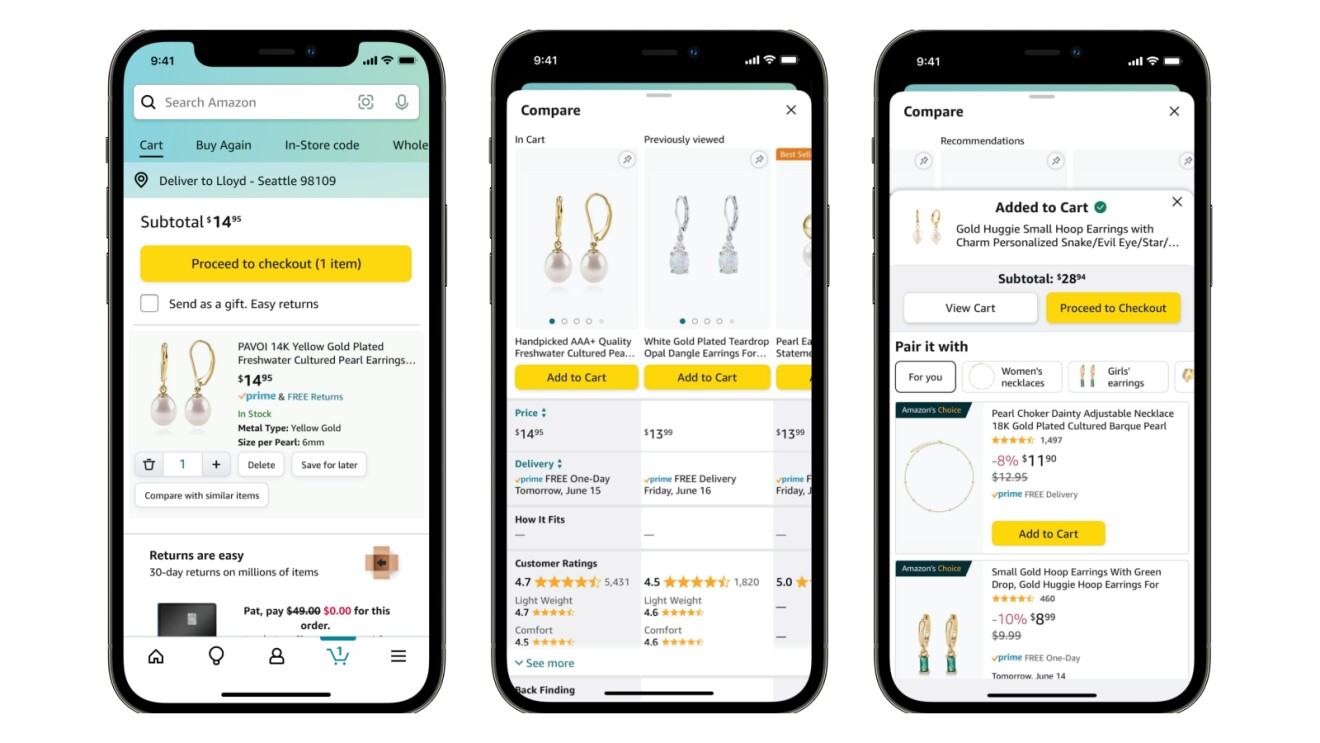
Many of your customers will visit your Shopify store on their phones. It’s important to make sure your store looks and works great on mobile devices to turn these visitors into buyers.
- Adopt Responsive Design: Ensure your Shopify store has a responsive design that offers a consistent shopping experience across all devices. Use themes optimized for mobile and test your site’s appearance and functionality on various devices.
- Improve Loading Speeds: Optimize images, use fast-loading Shopify themes, and consider using AMP (Accelerated Mobile Pages) for Shopify to improve your site’s loading speed on mobile devices. Faster loading times improve user experience and can significantly reduce bounce rates.
- Streamline Navigation and Search Options: Simplify your mobile site’s navigation to make it easy for customers to find what they’re looking for. A prominent and efficient search bar is crucial for helping mobile users quickly locate products.
- Implement Fast Checkout Options: Shopify offers features like Shop Pay, which, similar to Amazon’s one-click purchasing, enables users to checkout quickly using stored payment information. This can greatly enhance the checkout experience and increase conversion rates for mobile users.
- Optimize Content for Mobile: Make sure that all content, including product descriptions and images, is optimized for mobile. This means avoiding large blocks of text, using mobile-friendly images, and ensuring that interactive elements like buttons are easily clickable on mobile.
- Utilize Social Proof
Top restaurants use social proof to build their reputation and attract more customers. Social proof is when people look at what others are doing to decide what’s right. This can strongly influence what people buy. Shopify stores can use this idea too. Showing that other customers have had good experiences with your products can help convince new customers to buy from you.

Leveraging social proof can be a powerful way to build trust and credibility with your customers, ultimately driving higher conversion rates. Prominently displaying customer reviews, testimonials, and ratings can reassure potential buyers and encourage them to make a purchase.
- Showcase Customer Reviews and Ratings: Enable customer reviews on your Shopify store and actively encourage customers to leave feedback on their purchases. Highlighting positive reviews and ratings on product pages can significantly influence potential buyers by showing that others have had satisfactory experiences.
- Leverage User-Generated Content: Encourage your customers to share their product experiences on social media and tag your store. You can incentivize this behavior through contests or by featuring such content on your Shopify site or social media channels. Seeing real customers with your products builds trust and can influence others to make a purchase. Social media like TikTok help you to gain TikTok followers, create engaging challenges or campaigns that motivate users to share their experiences and tag your brand, thereby increasing your visibility and attracting a larger audience.
- Utilize Influencer Endorsements: Collaborate with influencers or celebrities who can endorse your products to their followers. Instagram influencer marketing, in particular, can be highly effective given the platform’s visual nature and strong engagement rates. Partnering with an Instagram and TikTok advertising agency can also help identify the right influencers for your target audience and create campaigns that resonate on platforms like TikTok. These endorsements serve as social proof that can increase your brand’s visibility and credibility, encouraging their audience to check out your store.
- Highlight Awards and Media Mentions: If your products or store has received any awards, recognitions, or positive media mentions, make sure these are prominently displayed on your website. Such accolades serve as a testament to your product quality and brand reputation, fostering trust among potential customers.
- Implement Social Proof Notifications: Some Shopify apps allow you to display notifications when someone makes a purchase. Seeing that others are buying can create a sense of popularity and urgency, encouraging visitors to complete their own purchases.
Leveraging social proof extends beyond your website. With TimelinesAI, you can easily manage and share customer testimonials received through WhatsApp directly on your site or social media, amplifying your store’s credibility.
- Simplify the Checkout Process
Ajio, a popular fashion and lifestyle platform in India, has made its checkout process easier to improve customer experience and increase sales. By making checkout smooth and simple, Ajio ensures more shoppers finish their purchases. Shopify store owners can use the same ideas to improve their own checkout process and boost sales.

The checkout process is a critical stage in the customer journey, and any friction or complexity can lead to cart abandonment. By minimizing the steps required to finalize a purchase and introducing guest checkout options, you can reduce the barriers to conversion.
- Implement a Simplified, One-Page Checkout: Use Shopify apps or customize your theme to create a one-page checkout experience that allows customers to view all necessary fields at once, thereby minimizing clicks and page loads.
- Offer a Guest Checkout Option: Ensure that your Shopify store allows customers to checkout without creating an account. Making registration optional removes a significant barrier for new customers.
- Provide Multiple Payment Options: Integrate various payment gateways and options into your Shopify store, including digital wallets and COD if applicable. Offering payment flexibility caters to a broader audience and can significantly decrease cart abandonment rates.
- Enable Address and Payment Information Storage: Use Shopify’s built-in functionality to allow repeat customers to save their shipping and payment details for a faster checkout process in the future.
- Optimize Design and CTAs on Your Checkout Page: Design your checkout page with a focus on simplicity and clarity. Ensure that your CTAs are prominent and that the page is free of any unnecessary distractions that could deter a customer from completing their purchase.
- Offer Free Shipping and Returns
Amazon Prime has used free shipping and returns to build customer loyalty and boost sales. This makes shopping online easier and worry-free. Shopify store owners can learn from this and offer similar perks to make their stores more attractive and trustworthy, which can increase sales.

Providing free shipping and a clear, hassle-free returns policy can be a powerful incentive for customers to complete their purchases. By highlighting your shipping thresholds and promoting your returns policy, you can address common concerns and increase conversion rates.
- Offer Free Shipping: You can increase your Shopify store’s conversion rates by offering free shipping. This could be conditional (e.g., free shipping for orders over a certain amount) to help increase the average order value, or it could be an unconditional free shipping offer, which is a powerful incentive for customers to complete their purchases.
- Promote Hassle-Free Returns: Implementing and clearly communicating a straightforward, cost-free return policy can significantly reduce the perceived risk of purchasing from your store. Customers are more likely to buy if they know that returns are easy and free, especially for products they haven’t seen or tried in person.
- Highlight These Policies: Ensure that your free shipping and hassle-free returns policies are highly visible throughout your site, especially on product pages, the checkout page, and in your marketing materials. This visibility reassures customers, making them more likely to complete a purchase.
- Monitor and Adjust Your Strategy: Keep an eye on how these policies affect your margins and customer behavior. You may need to tweak your strategy (e.g., adjusting the minimum order value for free shipping) to ensure that it’s sustainable and effectively boosting your conversion rates.
- Build Loyalty Programs: Consider creating a loyalty program that rewards frequent shoppers with benefits similar to Amazon Prime, such as special discounts, faster free shipping, or free returns. This can encourage repeat business and increase customer lifetime value.
Communicating your shipping and returns policy can be streamlined with TimelinesAI. Automate announcements and updates via WhatsApp, ensuring your customers always know about the great benefits you offer.
- Use Pop-Ups and Exit Intent
Nike, a global leader in sports apparel and equipment, strategically utilizes pop-ups and exit intent technology on their website to engage visitors, promote offers, increase subscribers, and ultimately drive conversions. This approach can be extremely effective for Shopify store owners looking to enhance their conversion rates by capturing the attention of potential customers at critical moments during their online shopping journey.

Strategic use of pop-ups and exit-intent technology can be effective in capturing customer attention and converting potential leads. By deploying these tactics, you can offer discounts, collect email addresses, and engage with customers who are about to leave your Shopify store.
- Implement Welcome Offers: Introduce a welcome pop-up for first-time visitors offering a discount code or special offer in exchange for their email subscription. This not only helps to convert visitors into customers but also builds your email marketing list.
- Use Exit Intent Pop-Ups: Add exit intent pop-ups to your Shopify store that trigger when a visitor is about to leave your site. Offer them a discount, a free shipping code, or remind them of the items they’ve shown interest in. This can significantly reduce cart abandonment rates and increase conversions.
- Highlight Time-Sensitive Offers: Use pop-ups to alert visitors of limited-time deals, exclusive offers, or the introduction of new products. The key is to create a sense of urgency that encourages them to act now rather than later.
- Solicit Feedback: Deploy pop-ups to gather customer feedback about your products or their shopping experience. This engagement can lead to improved customer satisfaction, and the act of asking for feedback can increase loyalty and trust.
- Optimize Pop-Up Timing and Frequency: Ensure that pop-ups are timed appropriately to not annoy visitors but to capture their interest or at the moment of exit intent. Experiment with different timings and frequency to find the sweet spot that maximizes engagement without decreasing user experience.
- Personalize Customer Experiences
Zepto, a fast grocery delivery service, uses data and technology to create personalized shopping experiences. This makes shopping more relevant and convenient for each customer. Shopify store owners can learn from Zepto and use personalization to improve their own strategies and boost sales.

Personalization can be a powerful tool in driving higher conversion rates. By leveraging customer data to offer personalized product recommendations and create targeted email marketing campaigns, you can enhance the customer experience and increase the likelihood of conversions.
- Use Customer Data for Recommendations: Use customer data to show personalized product suggestions on your Shopify store. Shopify apps can help with this, improving the shopping experience and possibly increasing sales.
- Customize Offers for Different Customers: Group your customers based on things like purchase history or browsing habits and offer special deals to each group. Personalized offers are more likely to lead to sales.
- Create a Personalized Shopping Experience: Make the shopping experience unique for returning customers by showing them recently viewed items, suggested products, or personalized banners. Shopify apps can help automate this, making your store adapt to each visitor.
- Engage Through Personalized Marketing: Use email and SMS tools to send personalized messages to your customers. This can include newsletters with products they might like, reminders for abandoned carts, and special discounts for their purchase anniversary or birthday.
- Encourage Feedback and Improve: Ask for customer feedback and keep improving your personalization strategy based on their input and your data. This helps you offer a better shopping experience over time.
Personalization is key in today’s market. Enhance your Shopify store’s personalized shopping experience by using TimelinesAI for targeted WhatsApp messages based on customer behavior and preferences.
- Implement SEO Best Practices
Optimizing your Shopify store for search engine visibility can drive more organic traffic and increase the likelihood of conversions. By focusing on product page optimization and creating engaging blog content through an SEO agency, you can improve your store’s searchability and attract more potential customers.
- Optimize Product Pages with Relevant Keywords: Conduct thorough keyword research and incorporate relevant, high-intent keywords into your product page titles, descriptions, and metadata to improve search engine rankings.
- Utilize Blog Content to Drive Organic Traffic: Regularly create and publish informative, SEO-optimized blog content that addresses your target audience’s pain points and interests. Using AI for SEO helps identify trends and optimize content effectively. This can help attract more prospective customers to your Shopify store.
- Enable Multiple Payment Options
IKEA, a top furniture retailer, knows that offering different payment options is important. This makes shopping easier for customers, reduces problems at checkout, and boosts sales. Shopify store owners can follow IKEA’s example by offering multiple ways to pay, which can help increase their own sales.

Providing a wide range of payment methods can make the checkout process more convenient and accessible for your customers, ultimately leading to higher conversion rates. Consider incorporating popular mobile payment systems to cater to the preferences of your tech-savvy customers.
- Offer Many Ways to Pay: Make sure your Shopify store accepts lots of payment methods, like credit cards, PayPal, and digital wallets. The more options you have, the less likely customers are to leave without buying because their preferred way to pay isn’t available.
- Consider Financing: Think about teaming up with services that let customers pay in installments, like Afterpay or Affirm. This can help customers buy more at once.
- Tell People About Your Payment Options: Make sure customers know they have lots of ways to pay by mentioning it on your product pages, at checkout, and in your ads. Knowing they can pay how they want can make customers more likely to buy.
- Make Checkout Easy: Keep the checkout process simple and quick. Don’t ask for too much info, and make sure your site works well on phones.
- Keep Up With Changes: Stay up-to-date on new payment trends and what customers like. Add new payment options if customers want them.
Once you’ve diversified payment options, use TimelinesAI to keep customers informed about their payment statuses and purchase confirmations through WhatsApp, enhancing transparency and trust.
- Leverage Email Marketing
Myntra, a top fashion platform in India, uses email marketing to boost engagement, build brand loyalty, and increase sales. They send personalized and timely emails to keep customers interested and encourage repeat purchases. Shopify store owners can use similar email marketing strategies to improve sales and build strong customer relationships.

Email marketing can be a highly effective tool for driving conversions, particularly when it comes to recovering abandoned carts and maintaining ongoing engagement with your customer base. By developing strategic email sequences and segmenting your email lists, you can maximize the impact of your email marketing efforts.
- Implement Segmentation and Personalization: Create segmented email lists based on customer behavior and preferences on your Shopify store. Use personalization techniques, such as including the customer’s name and recommending products based on past interactions, to make each email feel tailored to the individual.
- Create Timed and Targeted Promotions: Plan your email marketing around special promotions, seasonal events, and sales. Ensure these offers are targeted to segments of your audience most likely to be interested, increasing the relevance and effectiveness of your campaigns.
- Utilize Abandoned Cart Emails: Set up automated emails to remind customers of items they’ve left in their shopping cart. Consider including a small discount or free shipping offer to encourage them to complete the purchase.
- Provide Value Beyond Products: Incorporate content that educates, entertains, or informs your audience into your email marketing strategy. This could include style guides, product usage tips, or customer stories. Such content can enhance customer engagement and keep your brand top-of-mind.
- Optimize for Mobile: Ensure that all your emails are mobile-friendly, given that a significant portion of emails are read on mobile devices. This includes responsive design and concise content that renders well on smaller screens.
- Utilize A/B Testing
A/B testing is key to improving your Shopify store’s conversion rates. By testing different parts of your store, you can find out what works best and keep improving.
- Test Different Elements: Try out various changes to your store, like product page layouts, call-to-action buttons, and checkout processes, to see what works best.
- Analyze Results and Use Winning Strategies: Look closely at your test results and use the strategies that increase conversion rates the most.
For example,
To increase the number of product page visitors who add a product to their cart.
Variable to Test: The color of the “Add to Cart” button. The hypothesis is that a more prominent color will catch users’ attention better and potentially increase the add-to-cart rate.
Version A (Control): The current “Add to Cart” button is a muted gray.
Version B (Variant): The “Add to Cart” button is changed to a bright orange.
Process: Using an A/B testing tool, the Shopify store owner sets up the test so that 50% of the traffic sees Version A and the other 50% sees Version B. The test runs for a month to collect enough data.
Result: After a month, data analysis shows that Version B, with the bright orange “Add to Cart” button, resulted in a 15% higher add-to-cart rate compared to Version A.
The test suggests that the bright orange “Add to Cart” button is more effective at encouraging users to add products to their cart. The store owner decides to implement this change across all product pages.
Beyond testing your Shopify store’s elements, consider testing the effectiveness of customer engagement strategies through WhatsApp. TimelinesAI offers comprehensive reporting tools to analyze performance and engagement, allowing for informed adjustments to your communication tactics.
- Engage with Retargeting Campaigns
Retargeting campaigns help you increase Shopify sales by reaching out to people who visited your store but didn’t buy anything. These campaigns show personalized ads to remind them of the products they looked at or added to their cart, encouraging them to complete their purchase. Let’s go over how to set up a retargeting campaign and provide an example to explain it better.
- Implement Retargeting Ads: Set up retargeting ad campaigns to display your products to customers who have previously visited your Shopify store but didn’t make a purchase. This can help bring them back and complete the conversion.
- Use Dynamic Retargeting Ads: Leverage dynamic retargeting ads that display the specific products a customer has previously viewed, making the ads more personalized and relevant.
For example, to increase conversions by targeting visitors who added products to their cart but didn’t complete a purchase.
The Shopify store owner installs a Facebook pixel on their site, enabling the tracking of users who add items to their cart.
Audience Segmentation: The audience is segmented into users who added products to their cart within the last 30 days but did not make a purchase.
Customized Ad Content: The store creates ads that display the specific products that were added to the cart, along with a message such as “Complete your purchase and enjoy 10% off with code BACK10”. Also Check: How to Create Powerful WhatsApp Advertising Messages for Digital Marketing Success in 2024
Retargeting Platform: The ads are set up to run on Facebook and Instagram, targeting the segmented audience.
Campaign Outcome: After running for a month, the campaign sees a higher CTR and increased conversions compared to general ads. The discount code provided in the ads also allows the store owner to track how many sales are directly attributable to the retargeting campaign.
Conclusion
To take the next step in optimizing your Shopify store’s conversion rate, I recommend scheduling a free consultation with our team of ecommerce experts. We’ll dive deep into your store’s performance, identify areas for improvement, and develop a customized strategy to help you achieve your 2024 sales goals. Click the button below to get started.


