

Welcome to the era of seamless customer communication!
WhatsApp Business Platform has revolutionized how medium and large businesses interact with their customers.
It’s not just another messaging app; it’s a powerful tool that connects you directly with your audience, allowing for personalized interactions at scale.
Connecting Businesses with Customers Through Messaging:
With WhatsApp Business Platform, you can engage with your customers where they are – on their smartphones. Whether it’s sending order updates, answering queries, or providing support, WhatsApp Manager streamlines these interactions.
Take Sarah’s boutique, for example. She uses WhatsApp Business to notify her customers about new arrivals, promotions, and even personalized styling tips. By integrating WhatsApp Manager with her backend systems, like her CRM and marketing platforms, Sarah ensures that she maintains a cohesive communication strategy across all channels.
Integrating with Backend Systems for Seamless Communication:
Here’s where TimelinesAI steps in seamlessly. TimelinesAI offers a robust solution for managing WhatsApp conversations, providing features like automated responses, conversation tagging, and analytics.
By integrating TimelinesAI with WhatsApp Manager, businesses like Sarah’s boutique can efficiently manage their customer interactions, ensuring no message goes unanswered.
Imagine Sarah’s boutique receives a flurry of inquiries about an upcoming sale. With TimelinesAI, she can set up automated responses to common queries, freeing up her team to focus on more complex customer needs. Plus, TimelinesAI’s analytics provide valuable insights into customer behavior, helping Sarah tailor her marketing strategies for maximum impact.
Supporting Programmatic and Manual Interactions via APIs:
Whether you prefer a hands-on approach or want to automate repetitive tasks, WhatsApp Business Platform has you covered. With APIs, businesses can seamlessly integrate WhatsApp Manager into their existing workflows, allowing for both programmatic and manual interactions.
Let’s say Sarah’s boutique wants to offer personalized recommendations based on customer preferences. With WhatsApp Manager’s APIs, she can pull data from her CRM system to tailor recommendations for each customer. And with TimelinesAI’s intuitive interface, managing these interactions is a breeze, ensuring a seamless customer experience every time.
Whether you’re a small boutique or a multinational corporation, embracing WhatsApp Business Platform opens up endless possibilities for connecting with your audience in a more meaningful way.
So why wait? Start leveraging the power of WhatsApp Manager today and take your business to new heights!
Maximizing Efficiency: Understanding WhatsApp Business Platform APIs
- Unlocking Scalability with Cloud API
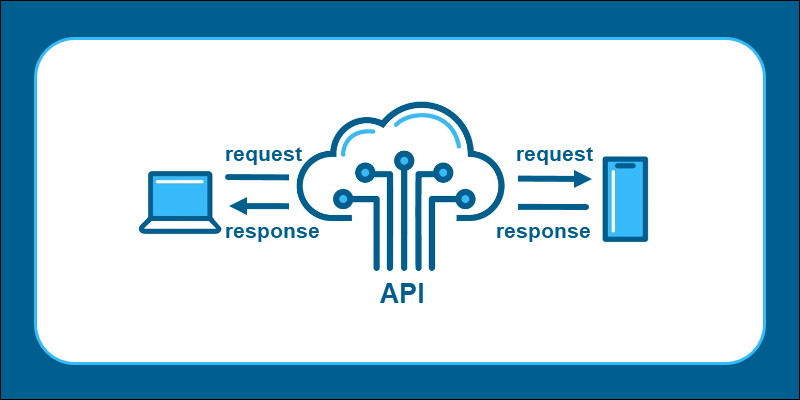
The Cloud API provided by WhatsApp Business Platform, hosted by Meta, offers businesses a scalable solution for messaging.
It allows you to seamlessly integrate WhatsApp Manager into your existing systems, ensuring smooth communication with your customers.
With TimelinesAI’s powerful features, such as automated responses and conversation analytics, managing your messages on the Cloud API becomes effortless.
Let’s consider a scenario: Jake runs a restaurant chain and wants to streamline his reservation process. By leveraging the Cloud API with WhatsApp Manager, Jake’s customers can easily book tables directly through WhatsApp. TimelinesAI’s automated responses ensure that reservation confirmations and reminders are sent promptly, providing a seamless experience for both Jake and his customers.
- Empowering Control with On-Premises API

For businesses that prefer to have full control over their messaging infrastructure, the On-Premises API is the ideal solution.
By using their own servers for messaging, businesses can ensure data privacy and compliance with regulatory requirements.
With WhatsApp Manager seamlessly integrated, managing customer interactions becomes a breeze.
Let’s take Lisa’s healthcare clinic as an example. By utilizing the On-Premises API with WhatsApp Manager, Lisa ensures that sensitive patient information remains secure. TimelinesAI’s robust features, such as message encryption and access controls, provide an added layer of security, giving Lisa peace of mind knowing that her patients’ data is protected.
- Streamlining Operations with Business Management API

The Business Management API offers businesses the flexibility to manage their WhatsApp Business accounts and settings programmatically.
From configuring profile details to receiving quality status updates, this API empowers businesses to optimize their operations efficiently.
With WhatsApp Manager and TimelinesAI, businesses can automate routine tasks and gain valuable insights into their messaging performance.
Consider Alex’s e-commerce store, which relies heavily on WhatsApp for customer support. By leveraging the Business Management API with WhatsApp Manager, Alex can easily monitor his account’s quality status and make necessary adjustments to ensure optimal performance. TimelinesAI’s analytics provide valuable insights into customer interactions, enabling Alex to improve his support processes continuously.
Understanding the various APIs offered by WhatsApp Business Platform is essential for businesses looking to maximize their efficiency and scalability.
Whether you opt for the Cloud API, On-Premises API, or Business Management API, integrating WhatsApp Manager with TimelinesAI empowers you to streamline your operations and deliver exceptional customer experiences.
Streamlining Your Presence: Setting Up Business Assets
- Essentials: Display Name, Phone Number, WhatsApp Business Account, and Meta Business Manager

Before diving into the intricacies of managing your WhatsApp Business Platform, it’s crucial to ensure your business assets are set up correctly.
Your Display Name, Phone Number, WhatsApp Business Account, and Meta Business Manager play pivotal roles in establishing your presence on the platform.
- Crafting an Engaging Display Name
Your Display Name is the first impression customers have of your business on WhatsApp.
It should be concise, descriptive, and reflective of your brand identity. Remember, your Display Name is what sets you apart from the competition and helps customers recognize your business amidst a sea of messages.
- Leveraging Meta Business Manager for Efficient Asset Management
Once your business assets are in place, it’s time to harness the power of Meta Business Manager. This centralized hub allows you to organize and manage your business assets effortlessly.
From creating message templates to monitoring your messaging performance, Meta Business Manager simplifies the complexities of WhatsApp Business Platform management.
- Seamless Integration with TimelinesAI

Now, let’s talk about how TimelinesAI elevates your experience with WhatsApp Manager.
TimelinesAI seamlessly integrates with Meta Business Manager, offering advanced features like message scheduling, conversation tagging, and performance analytics.
With TimelinesAI, managing your business assets and optimizing your messaging strategy becomes a breeze.
Consider Emily, who runs a digital marketing agency. By leveraging TimelinesAI with WhatsApp Manager, Emily can schedule promotional messages, track engagement metrics, and analyze customer feedback—all from a single dashboard. TimelinesAI’s intuitive interface and robust features empower Emily to streamline her workflow and deliver exceptional results for her clients.
Mastering Communication: Messaging on WhatsApp Business
- Embracing Flexibility:

- Free-form and Template Messages
WhatsApp Business Platform offers businesses the flexibility to communicate with customers through both free-form and template messages. Free-form messages allow for spontaneous, personalized interactions, while template messages provide a structured format for commonly sent messages such as appointment reminders or shipping updates.
- Enhancing Efficiency with Template Messages
Template messages are a game-changer for businesses looking to streamline their communication process. By leveraging pre-approved message templates, businesses can ensure consistency and accuracy in their communications. Plus, with TimelinesAI’s template management feature, businesses can easily create, organize, and customize templates to suit their specific needs.
Imagine Sarah, the owner of a travel agency, needs to send out booking confirmations to her customers. Instead of typing out individual messages every time, Sarah can use a template message created through TimelinesAI. With just a few clicks, she can send personalized booking confirmations to her customers, saving time and ensuring a professional communication experience.
- Respecting User Privacy with Opt-in Mechanisms

It’s important to note that sending template messages requires user opt-in. This ensures that customers have consented to receiving messages from your business, promoting trust and transparency.
By adhering to WhatsApp’s policies and guidelines, businesses can maintain positive relationships with their customers and avoid spamming or misuse of the platform.
- Seamless Integration with TimelinesAI

TimelinesAI enhances the messaging experience on WhatsApp Business Platform by offering features like message scheduling, template management, and conversation analytics.
With TimelinesAI, businesses can automate routine tasks, track message performance, and gain valuable insights into customer interactions—all within a user-friendly interface.
For example, Alex, a customer support manager, can use TimelinesAI to schedule template messages for common inquiries, such as product returns or order updates. By analyzing response rates and customer feedback through TimelinesAI’s analytics, Alex can refine his messaging strategy and deliver a seamless customer experience.
In conclusion, mastering messaging on WhatsApp Business Platform requires a balance of flexibility, efficiency, and respect for user privacy. And with the support of TimelinesAI, businesses can optimize their messaging strategy and drive meaningful interactions with their customers.
Navigating WhatsApp Business: Pricing, Payment, and Policies
- Value-driven Pricing with WhatsApp Manager

WhatsApp Business Platform offers a transparent and value-driven pricing model, ensuring that businesses of all sizes can access its powerful features.
With WhatsApp Manager, businesses are charged per conversation, allowing for cost-effective communication with customers.
Additionally, the first 1,000 monthly conversations are free, enabling businesses to explore the platform without financial constraints.
- Seamless Compliance with Policies

Compliance with WhatsApp Commerce Policy and Business Policy is essential for businesses utilizing WhatsApp Business Platform.
These policies outline guidelines for acceptable business practices, ensuring a positive and secure experience for users.
With TimelinesAI’s compliance monitoring feature, businesses can effortlessly adhere to these policies, mitigating the risk of account suspension or penalties.
- Streamlined Business Verification and Display Name Guidelines

Business verification and adherence to Display Name guidelines are crucial steps in establishing credibility and trust on WhatsApp Business Platform.
Verified businesses are distinguished by a green checkmark badge, instilling confidence in users and enhancing brand reputation.
TimelinesAI simplifies the verification process by providing step-by-step guidance and ensuring compliance with Display Name guidelines, facilitating a smooth onboarding experience for businesses.
Consider Alex, who runs an online retail store. With TimelinesAI’s guidance, Alex successfully verifies his business and sets up a compliant Display Name, enhancing his store’s credibility and visibility on WhatsApp. As a result, Alex experiences increased customer trust and engagement, ultimately driving sales and revenue for his business.
Staying Ahead: Monitoring and Feedback with WhatsApp Manager
- Harnessing the Power of Webhooks for Real-time Insights

Webhooks are invaluable tools for businesses seeking real-time insights into their WhatsApp Business interactions.
With WhatsApp Manager, businesses can set up webhooks to receive notifications on various events, including messages received, phone number changes, and more.
This real-time data allows businesses to stay informed and responsive, providing timely assistance to their customers.
- Empowering Decision-Making with Overview Dashboard

The Overview Dashboard provided by WhatsApp Manager serves as a centralized hub for monitoring and feedback.
This intuitive dashboard offers a comprehensive overview of key metrics, including message volumes, response times, and customer engagement rates.
Additionally, the Overview Dashboard features a robust educational hub, providing businesses with valuable resources and insights to optimize their WhatsApp Business strategy.
- Seamless Integration with TimelinesAI: Enhancing Monitoring Capabilities

TimelinesAI seamlessly integrates with WhatsApp Manager, enhancing businesses’ monitoring capabilities and providing actionable insights.
With TimelinesAI, businesses can leverage advanced analytics and reporting features to track message performance, identify trends, and measure the effectiveness of their messaging strategy.
Consider Sarah, who runs a customer support team for an e-commerce platform. By integrating TimelinesAI with WhatsApp Manager, Sarah gains access to detailed analytics on message volumes, response times, and customer satisfaction scores. Armed with this data, Sarah can identify areas for improvement, implement targeted training programs for her team, and ultimately enhance the overall customer experience.
Unlocking Efficiency: Accessing and Using WhatsApp Manager

- Step-by-Step Guide to Access WhatsApp Manager
Accessing WhatsApp Manager is a breeze with our step-by-step guide.
Simply navigate to Facebook Business Suite, where you’ll find the WhatsApp Manager feature seamlessly integrated.
This centralized platform allows businesses to manage their WhatsApp Business accounts with ease, streamlining communication and enhancing customer engagement.
- Navigating Settings for Account Management
Once you’ve accessed Facebook Business Suite, navigate to the settings menu to find the WhatsApp Accounts option.
Here, you’ll discover a wealth of tools and features designed to optimize your WhatsApp Business operations.
From managing message templates to monitoring message performance, WhatsApp Manager puts the power of communication in your hands.
- Admin Access for Enhanced Control
It’s important to note that only Admins have access to the WhatsApp Accounts option within Facebook Business Suite.
If you’re not the Admin, you may need to verify your status or request admin access to proceed.
This ensures that only authorized personnel have control over your WhatsApp Business accounts, safeguarding against unauthorized access and maintaining data security.
- Seamless Integration with TimelinesAI: Enhancing Management Capabilities

As you navigate through WhatsApp Manager, consider integrating TimelinesAI to enhance your management capabilities further.
TimelinesAI offers a suite of features designed to streamline communication, automate tasks, and provide valuable insights into your messaging strategy.
By integrating TimelinesAI with WhatsApp Manager, you can unlock the full potential of your WhatsApp Business operations and drive meaningful interactions with your customers.
Imagine Sarah, the owner of a small bakery. By accessing WhatsApp Manager and integrating TimelinesAI, Sarah can manage her orders, respond to customer inquiries, and track her messaging performance—all from a single platform. With TimelinesAI’s automated responses and analytics, Sarah can optimize her communication strategy, increase efficiency, and delight her customers with personalized service.
By integrating TimelinesAI, businesses can elevate their management capabilities, drive efficiency, and unlock new opportunities for growth.
Conclusion
Mastering the art of accessing and managing WhatsApp Business Platform is essential for businesses seeking to enhance customer communication and streamline operations. With the powerful features of WhatsApp Manager and the added benefits of integrating TimelinesAI, businesses can unlock new opportunities for growth, drive efficiency, and deliver exceptional customer experiences.
From setting up business assets to navigating pricing and policies, every aspect of WhatsApp Business Platform management has been explored, providing businesses with the tools and knowledge needed to succeed in today’s digital landscape. So, embrace the possibilities, take the next steps with confidence, and watch your business thrive on WhatsApp Business Platform.


